July is the month the office quietly empties out. Half the team is on leave, the other half is covering two jobs, and the person you'd normally lean over to ask "did you actually send this?" is on a beach with their phone off. That gap is the whole point. The safest month for an attacker is the one where nobody's around to check.
What strikes me about this batch is how ordinary they all are. Nothing here screams. No frozen accounts, no legal threats, no countdown timers. Just five routine-looking emails that happen to land in a week when everyone's running light and trying to clear the decks before their own holiday. Each one leans on a different pressure: a security change, a fear of oversharing, office routine, travel logistics, and a sense of duty. The callout on each template names the hook, so your team learns to spot the lever, not just the logo.
Download these phishing templates for your in-person security awareness training materials! And check out this list of best phishing simulation tools 2026
1. Passkey Pivot
Passwords are genuinely on their way out, which is exactly what makes this one land.
.jpg?width=800&height=703&name=set-up-your-passkey%20(1).jpg)
The Hook: An email from IT Support, subject Action Required: Set Up Your Passkey, tells the recipient the organization is retiring passwords and they need to enroll a passkey by Friday to keep access. It's helpful, it's on-trend, and there's a soft deadline. Everything about it matches a real project a lot of companies are actually running right now, so it sails straight past the usual suspicion.
Real-World Risk: The "Set Up Passkey" button leads to a spoofed identity provider login, an Okta or Microsoft Entra clone. The victim enters their current credentials to "start enrollment," and that's the harvest. Worse, if the flow walks them through registering a passkey, they may be enrolling the attacker's device as a trusted authenticator, which is persistent access that survives a password reset.
Learning Moment: Real authentication changes happen inside your account settings or through a tool your IT team points you to directly, never through a button in an unexpected email. Teach the team to start passkey or MFA enrollment from a bookmark or the company portal, and to treat any emailed "set this up now" link as the thing to verify first.
2. Away Giveaway
Nobody thinks of their out-of-office reply as an attack surface, which is why this works.
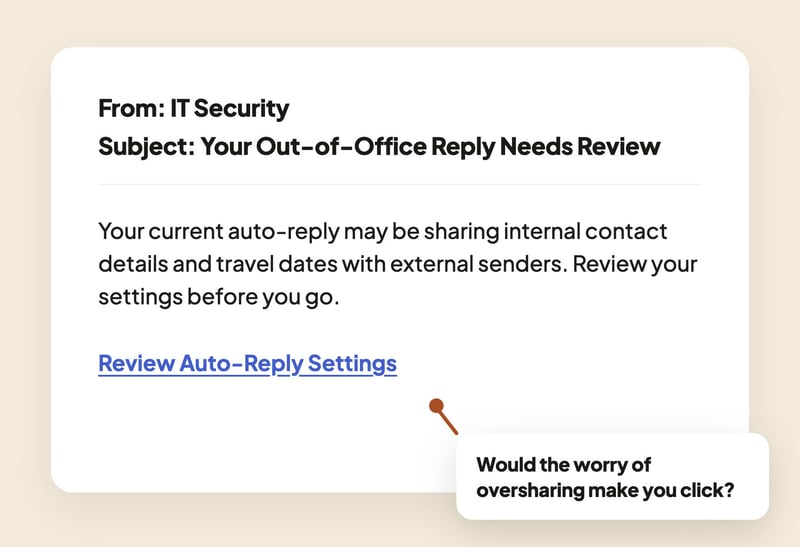
The Hook: A note from IT Security warns that your auto-reply may be sharing internal contact details and travel dates with external senders, and invites you to review your settings before you go. It arrives right as you're setting your out-of-office, so the timing feels almost thoughtful. The pull here is mild embarrassment, the worry that you've already overshared.
Real-World Risk: The "Review Auto-Reply Settings" link goes to a fake Microsoft 365 or Outlook login. Once credentials are in, the attacker has the mailbox, and a mailbox in summer is a goldmine of who's away, who's covering, and which approvals are being rushed. That's the raw material for a follow-up invoice or wire-transfer scam aimed at whoever's left holding the fort.
Learning Moment: If an email nudges you to log in to change a setting, open the app yourself instead. Auto-reply settings live inside your mail client, so there's never a reason to reach them through an emailed link. It's a good one to pair with a reminder about what an out-of-office should and shouldn't reveal.
3. Paper Trail
Some phishing doesn't dress up at all. It just looks like Tuesday.
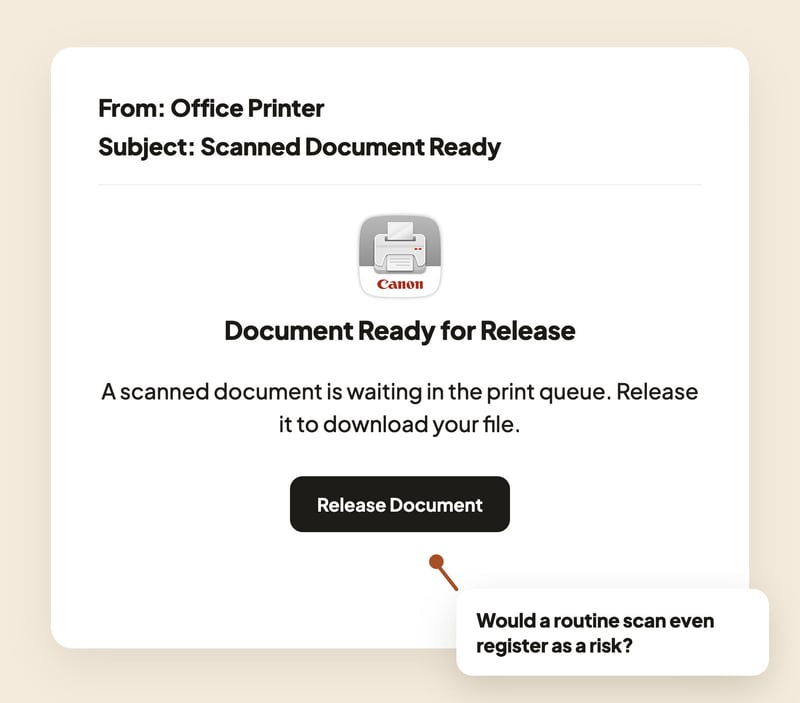
The Hook: A plain notification, sender Office Printer, subject Scanned Document Ready, says a scan is waiting in the print queue and you can release it to download your file. There's no urgency and no threat. In a busy office people scan and forward things constantly, so this barely registers as a decision. The odd detail, if anyone stops to notice, is that they weren't at a scanner that day.
Real-World Risk: The "Release Document" button opens a spoofed SharePoint or Microsoft 365 sign-in page to "access your file." Scan-to-email from office multifunction printers is a real workflow, which is exactly why attackers copy it. The document never existed. The login page is the whole attack, and the credentials go straight to credential harvesting and mailbox takeover.
Learning Moment: A genuine scan-to-email lands as an attachment, not as a link asking you to log in to view it. Train people to be suspicious of any "document" that needs a sign-in to open, and to check with the sender through a normal channel if they weren't expecting it. The boring ones deserve the same pause as the scary ones.
4. Offsite Update
A change of plans is one of the easiest things in the world to make someone click.
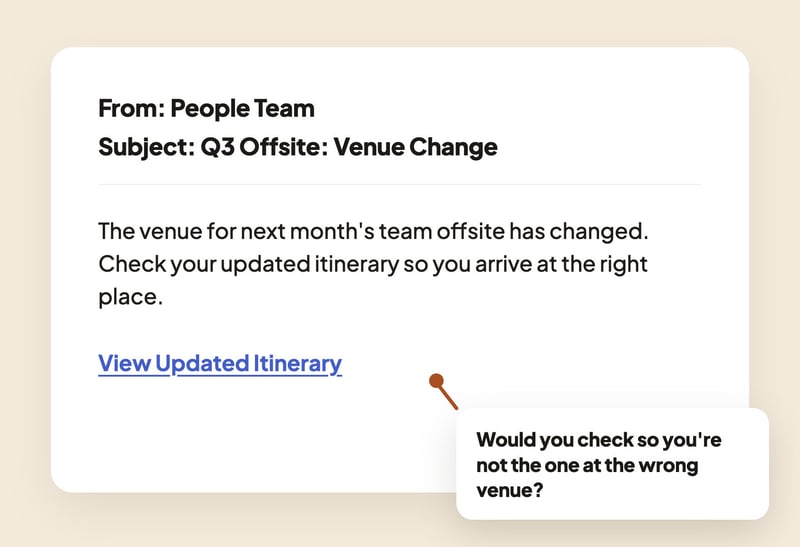
The Hook: An email from the People Team announces that the venue for next month's Q3 offsite has changed and asks you to check your updated itinerary. Nobody wants to be the person who turns up at the wrong address, so curiosity and a little social anxiety do the work. It's helpful, it's plausible, and it's the kind of message people genuinely forward to each other.
Real-World Risk: The "View Updated Itinerary" link leads to a fake SSO login or a shared document that asks you to authenticate first. Enter credentials and they're harvested. In an OAuth variant, "connecting your calendar" to see the new details hands over a token that can read your mail and calendar without ever touching your password, which means MFA doesn't save you.
Learning Moment: Company event details come through channels you already know, your calendar, the intranet, a named colleague in your team. If an itinerary link asks you to log in or grant access, stop and confirm through one of those known channels. Verify the event exists before you verify anything to the email.
5. Cover Story
When you're covering for someone on leave, saying yes quickly feels like doing your job well.
.jpg?width=800&height=703&name=coverage-assignment%20(1).jpg)
The Hook: An email, dressed as an HR system notification, tells you you've been assigned as coverage for a colleague who's on leave and asks you to review your temporary responsibilities and confirm. In July this is completely normal. People really are picking up each other's work. The lure is duty, the instinct to be a good teammate and not hold things up while someone's away.
Real-World Risk: The "Review Responsibilities" button leads to a cloned Workday or BambooHR login, and the credentials are harvested on entry. Because these accounts often sit behind the same SSO as everything else, one careless login can open payroll, personal data, and internal systems well beyond the "coverage" the email pretended to be about.
Learning Moment: Reach HR tools the way you always do, through your bookmark or the company portal, not through a link in a notification. If you're genuinely being asked to cover for someone, that's worth a thirty-second check with your manager or HR anyway. Duty is a lever, and a good teammate can pause for half a minute without letting anyone down.
Moving From Awareness to Habit
The through-line this month isn't a clever trick. It's a quiet office. Every one of these lures is betting that the usual second pair of eyes is on holiday and that a lighter team will click to clear the decks rather than stop to check.
So the skill worth building in July isn't spotting a typo or a dodgy logo. It's the small habit of reaching the real thing directly, your settings, your portal, your bookmark, instead of following the link that came to you. That habit doesn't take a heavier workload or a suspicious mind. It just takes a pause, and a pause is something even a skeleton crew can afford.
Explore our phishing simulation library and pick the variations that best match the tools your team actually uses.
Want to explore more? Browse our blog for additional templates, and stay ahead of cyber threats with our curated training resources.
Ready to level up? Register for a free trial of Wizer Boost to access our full library of phishing templates and exercises!
Learn how to set up your first simulation in minutes.
.png?width=501&height=501&name=Phishing-Example-PDFs-mar%20(4).png)