By May, the inbox has fallen into a rhythm. The wild swings of Q1 are behind us, summer plans are starting to creep in, and the AI tools we onboarded six months ago have quietly become part of the furniture. Cybercriminals know this, and that familiar, slightly drowsy feeling is exactly when their "just a quick admin task" emails work best. This month's simulations lean into that comfortable hum, where messages sound routine, systems sound trustworthy, and a single click feels like the easiest way to keep things moving.
Download these phishing templates for your in-person security awareness training materials and check out this list of the best phishing simulation tools 2026
Refund Reflex
Few things grab our attention quite like an email suggesting we're owed money. We can ignore a marketing nudge or mute a meeting reminder, but cash sitting in some kind of pending state? That's harder to leave alone, especially when there's a deadline attached.
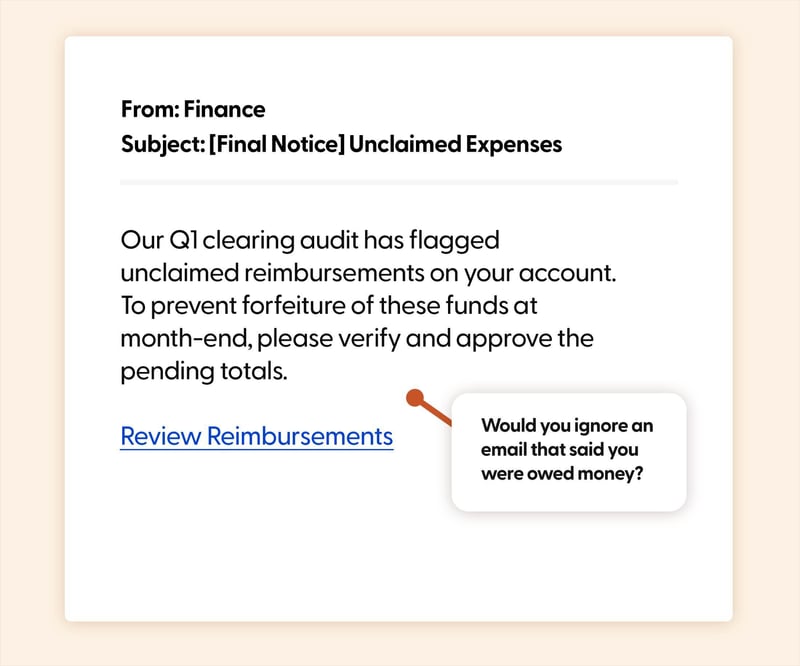
The Hook: A "Final Notice" from Finance lands in the inbox, warning that the Q1 clearing audit has flagged unclaimed reimbursements on your account. If you don't verify and approve the pending totals before month-end, the funds will be forfeited. There's no number shown and no breakdown, just enough to make you want to find out what's there, with a tidy "Review Reimbursements" link to make it easy.
Real-World Risk: The link leads to a spoofed expense portal, often mimicking a tool like Expensify, SAP Concur, or an internal finance dashboard. Once credentials are entered, attackers can pivot into linked payroll and banking flows.
Learning Moment: Money-owed lures are powerful because they flip the usual phishing emotion on its head, swapping fear for curiosity and mild excitement. Help your team build a habit of checking reimbursements directly inside the expense tool they already use, not via a chase-up link. Real finance teams almost never threaten forfeiture with vague totals.
Intruder Illusion
Security alert emails are designed to make us act fast, and we usually do. The irony is that the rush to "secure" an account is often what gets it taken over in the first place.
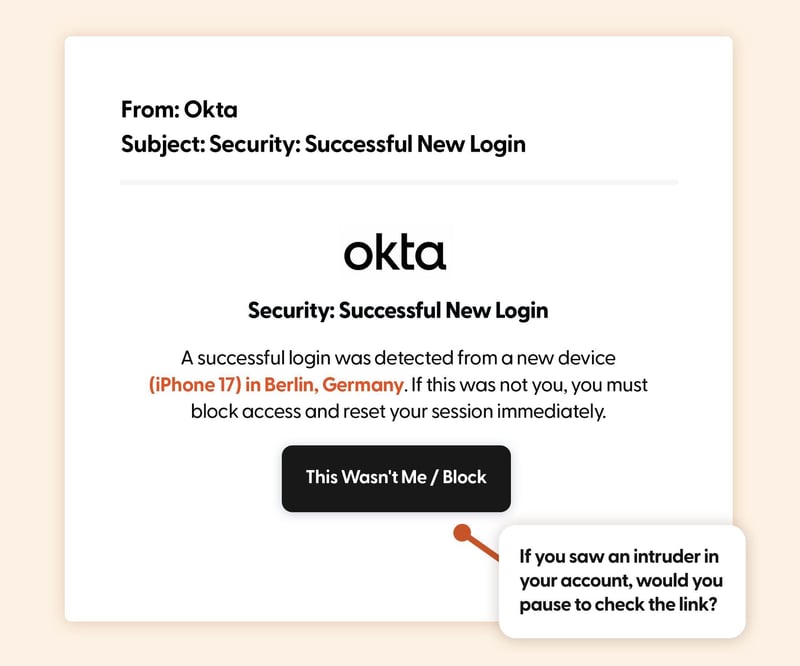
The Hook: An Okta-branded notification reports a successful login from a new device: an iPhone 17 in Berlin, Germany. There's no question framed; it just states that if it wasn't you, you must block access and reset your session immediately. The "This Wasn't Me / Block" button gives a single, comforting way out of the panic.
Real-World Risk: The button leads to a near-perfect clone of the Okta sign-in page. Because users are already in "block the intruder" mode, they're far less likely to scrutinise the URL before entering credentials, and many of these pages now relay codes in real time to bypass MFA.
Learning Moment: The more legitimate-looking an alert is, the more important it is to slow down. Encourage your team to navigate to Okta (or any SSO provider) directly through their bookmark or the app, never via a link in an email, even when the email looks like the real thing. If there really was a suspicious login, it'll still be there to deal with sixty seconds later.
Migration Mirage
IT-flavoured emails work because most of us don't fully understand the systems they reference, and we trust that the people sending them do. A polite warning from "IT Support" with a countdown attached can do a lot of work in very few words.
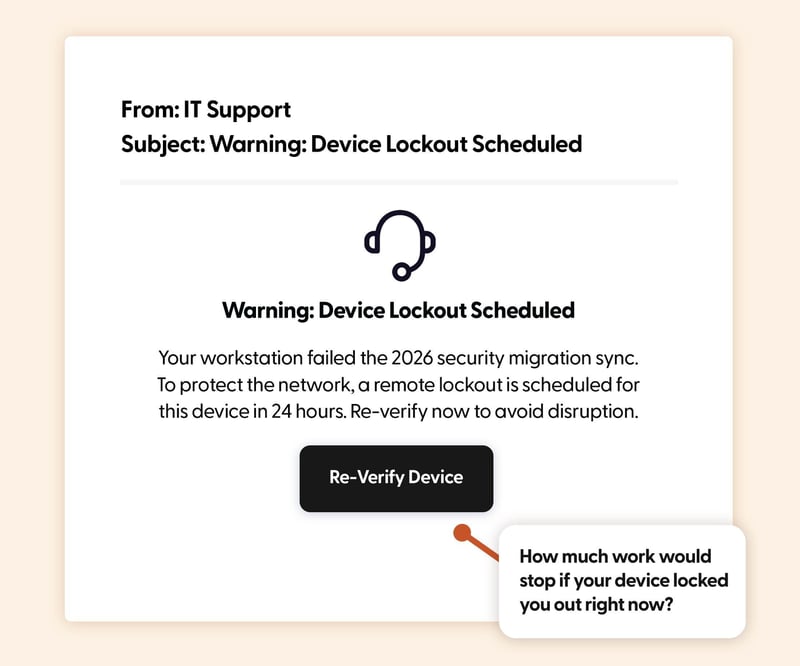
The Hook: The email warns that your workstation failed the 2026 security migration sync, and that to protect the network, a remote lockout is scheduled in 24 hours. "Re-verify now to avoid disruption" is the entire ask. The threat isn't dramatic, just inconvenient. And inconvenience, mid-week, is often enough.
Real-World Risk: The link points to a fake re-verification portal, usually styled to look like the company's own identity or device-management tool. Credentials and MFA codes are harvested in real time, and in some campaigns a "verification agent" download follows, quietly installing a remote access tool.
Learning Moment: Made-up technical reasons are a phisher's favourite, because they rely on the recipient not wanting to look uninformed. Help your team know what your real IT processes look like, and reassure them that asking "is this real?" in a Slack channel is always the right move, even when the deadline sounds tight.
Ghost Agent
In 2026, most of us have more AI assistants connected to our accounts than we can comfortably remember. That gap between what's connected and what we remember connecting is exactly where this one lives.
.jpg?width=800&height=667&name=AI-audit-May-2026%20(1).jpg)
The Hook: A "Security" email flags an orphaned AI Assistant on your account that still has persistent data access. Per 2026 privacy standards, it says, you should audit these scopes. The "Audit Agent Scopes" button feels less like a phishing lure and more like genuine hygiene, the kind of thing you'd thank a security team for sending.
Real-World Risk: The audit page is a fake permissions screen that mimics a real OAuth or agent-management dashboard. To "review and revoke," you're asked to authenticate, handing over either your SSO credentials or, increasingly, granting a malicious agent its own genuine access tokens to your inbox, drive, and calendar.
Learning Moment: This template highlights a very current risk: the AI agents we've stopped paying attention to. Encourage your team to audit connected apps periodically from inside their account settings, not through emailed links. If a security team really needs you to revoke something, they'll point you at the official settings page, not a one-click button.
Leave Limbo
By mid-May, summer plans are taking shape, and anything standing between you and a confirmed holiday date suddenly carries weight it wouldn't have in March.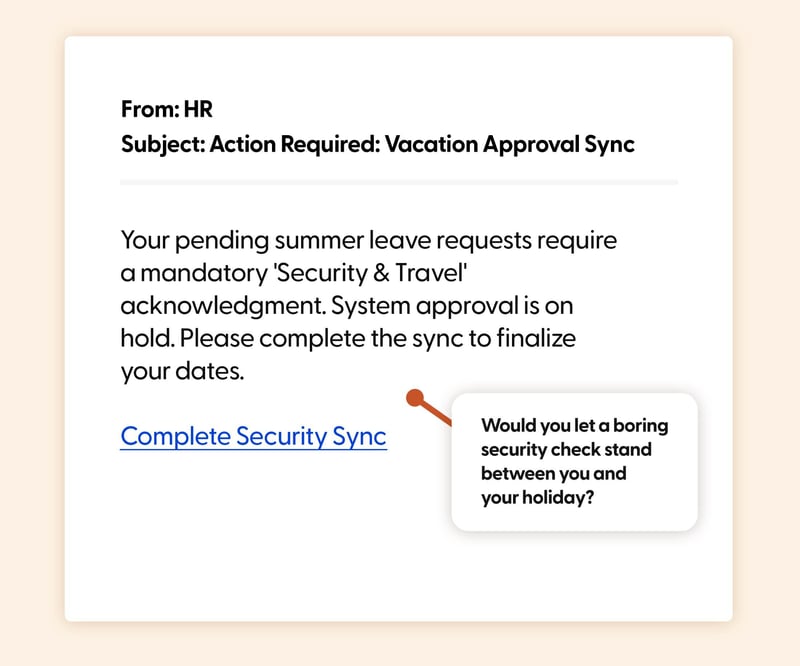
The Hook: An email from HR says your pending summer leave requests need a mandatory "Security & Travel" acknowledgment. System approval is on hold until you complete the sync. The framing is brilliantly boring. It doesn't threaten your job, it just delays your dates. And the "Complete Security Sync" link is the obvious way out.
Real-World Risk: The link leads to a spoofed HR or HRIS login page (think Workday, BambooHR, or a generic SSO-styled portal). Credentials harvested here can unlock not just leave but pay details, personal information, and onboarding documents that make follow-on attacks easier.
Learning Moment: Phishers know that anything blocking a personal milestone (booking flights, locking in dates, finishing the working week) earns extra urgency from us. Train your team to confirm "new" HR processes via your normal HR channel before clicking. A real policy change will be announced, repeated, and never gate your holiday behind a single emailed link.
Phishing in 2026 isn't getting louder, it's getting quieter. The most effective lures now blend into the background of legitimate admin: audit notices, sync warnings, agent permissions, mid-year HR check-ins. The good news is that the same simulations that teach your team to spot them also make those checks feel less daunting. Want to run one (or all five) of these with your team? Head over to our full phishing simulation library and pick the ones that fit your inbox ecosystem best.
Want to explore more? Browse our blog for additional templates, and stay ahead of cyber threats with our curated training resources.
Ready to level up? Register for a free trial of Wizer Boost to access our full library of phishing templates and exercises!
Learn how to set up your first simulation in minutes.
.png?width=501&height=501&name=Phishing-Example-PDFs-mar%20(1).png)