Work doesn’t feel the same as it did a year ago. AI tools are quietly doing more of the work for us. Systems run in the background, notifications nudge us along, and a lot of what used to take effort now just happens.
Phishing has started to blend into all of that.
There's less panic, fewer obvious red flags, and a lot more of the everyday, "just click to continue."
This month’s simulations focus on those everyday moments - the ones that feel routine, helpful, and easy to act on without thinking. Each one is designed to test a simple habit: do you pause, or do you click?
Download these phishing templates for your in-person security awareness training materials! & if you're ready to start a phishing simulation at no cost, we offer FREE phishing simulations right here ,
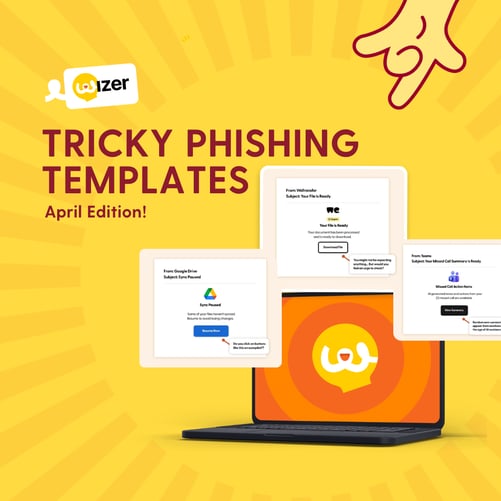
Sync Paused
Behind the scenes, syncing keeps everything moving. When it stops, even briefly, it feels like something needs fixing.
.jpg?width=800&height=667&name=googledrive-phishing-simulation-April-2026%20(1).jpg)
The Hook:
An email from Google Drive warns that some files haven’t synced correctly. It suggests you “Resume Sync” to avoid losing recent changes. The tone is calm, but the implication is clear: something might break if you don’t act.
Real-World Risk:
Clicking the button could lead to a fake Google login page designed to capture credentials. In some cases, users may also be prompted to download a “sync tool” that installs malware.
Learning Moment:
Not every threat feels urgent. Some feel like maintenance. Train employees to treat system alerts with caution and always check syncing or storage issues directly through the official app, not email links.
File’s Ready
We’re used to files arriving, processing, and being ready when we need them. That’s what makes this one so easy to trust.
.jpg?width=800&height=667&name=wetransfer-phishing-simulation-April-2026%20(1).jpg)
The Hook:
An email from WeTransfer (or a similar service) tells you your document has been processed and is ready to download. There’s no context, no explanation - just a simple “Download File” button.
Real-World Risk:
The link may lead to a malicious file download or a spoofed login page. Attackers rely on the assumption that if something is ready, you must have requested it.
Learning Moment:
Unexpected doesn’t always feel suspicious when it looks useful. Encourage employees to question files they weren’t actively waiting for, even if the message feels routine.
Surprise Summary
AI-generated summaries are quickly becoming part of everyday work. That familiarity makes them easy to fake.
.jpg?width=800&height=667&name=teams-phishing-simulation-April-2026%20(1).jpg)
The Hook:
An email from Teams (or another meeting platform) says AI-generated notes and action items from a missed call are ready to review. It even references multiple missed calls to make it feel more believable.
Real-World Risk:
Clicking the link could redirect users to a fake Microsoft login page, giving attackers access to email, files, and internal systems.
Learning Moment:
As AI-generated content becomes more common, so do opportunities to impersonate it. Remind employees to access meeting summaries through the platform itself, not through email prompts.
Input Needed
AI tools don’t just assist anymore - they act. And when they pause, it feels natural to step in and help.
.jpg?width=800&height=667&name=claude-phishing-simulation-April-2026%20(1).jpg)
The Hook:
An email from an AI assistant (like Claude or another tool) says a task has been paused and needs your input to continue. The request feels small, quick, and part of something already in progress.
Real-World Risk:
The “Review Task” button could lead to a phishing page that captures login credentials or triggers a malicious workflow.
Learning Moment:
When something feels like a continuation, we’re less likely to question it. This is exactly what attackers rely on. Encourage users to verify AI-related notifications within the tool itself before taking action.
Salary Snapshot
Few things grab attention faster than something that feels personal - especially when it relates to pay.
.jpg?width=800&height=667&name=compensation-summary-phishing-simulation-April-2026%20(1).jpg)
The Hook:
An email from HR announces that your compensation snapshot is ready to view, including salary, bonus, or benefits updates. It feels routine, but relevant enough to check immediately.
Real-World Risk:
The link may lead to a fake HR portal designed to capture login credentials or sensitive personal information.
Learning Moment:
Highly personal communications don’t need urgency to drive clicks. Employees should always access HR systems directly when reviewing sensitive information, rather than relying on email links.
Phishing doesn't need to feel like a scam anymore. It just needs to feel normal enough to slip through.
These simulations are built for those quieter moments, when nothing feels obviously wrong but something still deserves a second look. The goal isn't to make people suspicious of everything.
It’s to help them notice when something feels just a little too easy to click.
Want to explore more? Browse our blog for additional templates, and stay ahead of cyber threats with our curated training resources.
Ready to level up? Register for a free trial of Wizer Boost to access our full library of phishing templates and exercises!
Learn how to set up your first simulation in minutes.