Wizer Logo
Already a customer?

Get a Free AI Risk Assessment, See How Your Team Uses AI

✓ No credit card ✓ Anonymous for your team ✓ Takes a few minutes to set up.
20,000+ Organizations
Wizer works with 10,000+ Companies 19+ Languages
4.7 User Rating 150,000+ employee training reviews

Discover Your Organization’s AI Risk Score
Not Ready? Book a Quick Demo
Powering Security Awareness Training For:
  • Acronis
  • Cowbell
  • Coalition
  • At-Bay
  • Tokio-Marine
  • Acrisure
  • Misbo
  • Travelers

What Is an AI Risk Assessment?

An AI risk assessment is a quick, anonymous way to see how your team is actually using AI tools day to day , not how you assume they're using them. It shows where AI is genuinely helping people work faster, and where it's creating risk: sensitive data pasted into a public tool, unapproved AI apps in use, or decisions being made without anyone checking the output. Most companies have a policy. Few have any visibility into whether it matches reality.

How to Run a Free AI Risk Assessment

Wizer Trusted
Organizations
0

Trusted
Organizations

Regulation Topics Covered by Wizer
0

Regulation Topics Covered

icon-languages_offered
0

Languages Offered

  • Create your free account in minutes

    You get a private dashboard right away.
  • Share one anonymous link

    No account, login, or name required from anyone who responds.
  • Watch your dashboard fill in. 

    Watch as results come back in, live!

See the Results in Your Dashboard

Shadow AI Exposure Index
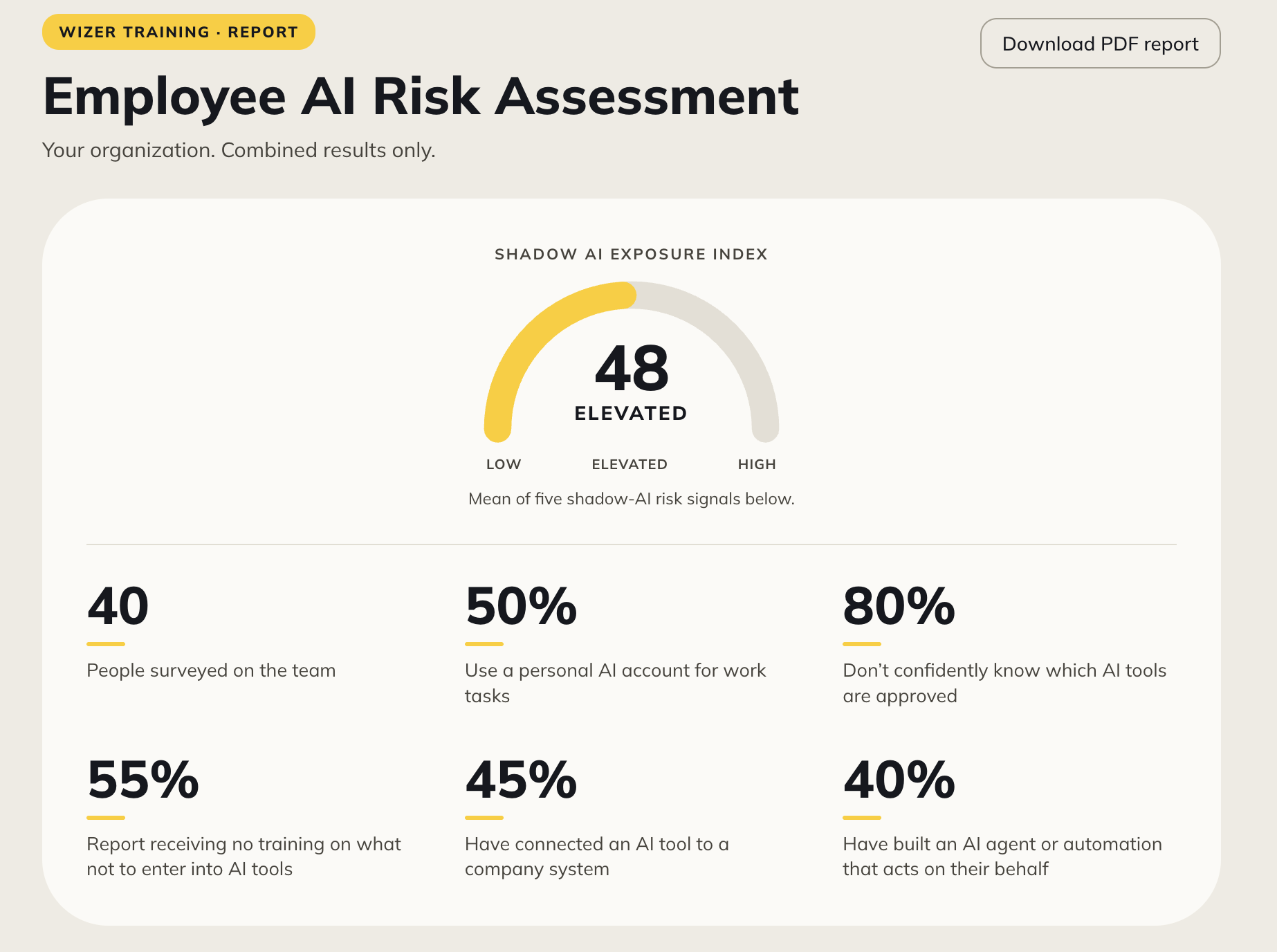
Your dashboard opens with a single score: Low, Elevated, or High. Built from five signals in your team’s answers: personal AI accounts, unapproved tools, missing training, unsanctioned system connections, and self-built AI agents.


Screenshot 2026-10-12 at 2.29.25 PM

What the Shadow AI Exposure Index Measures

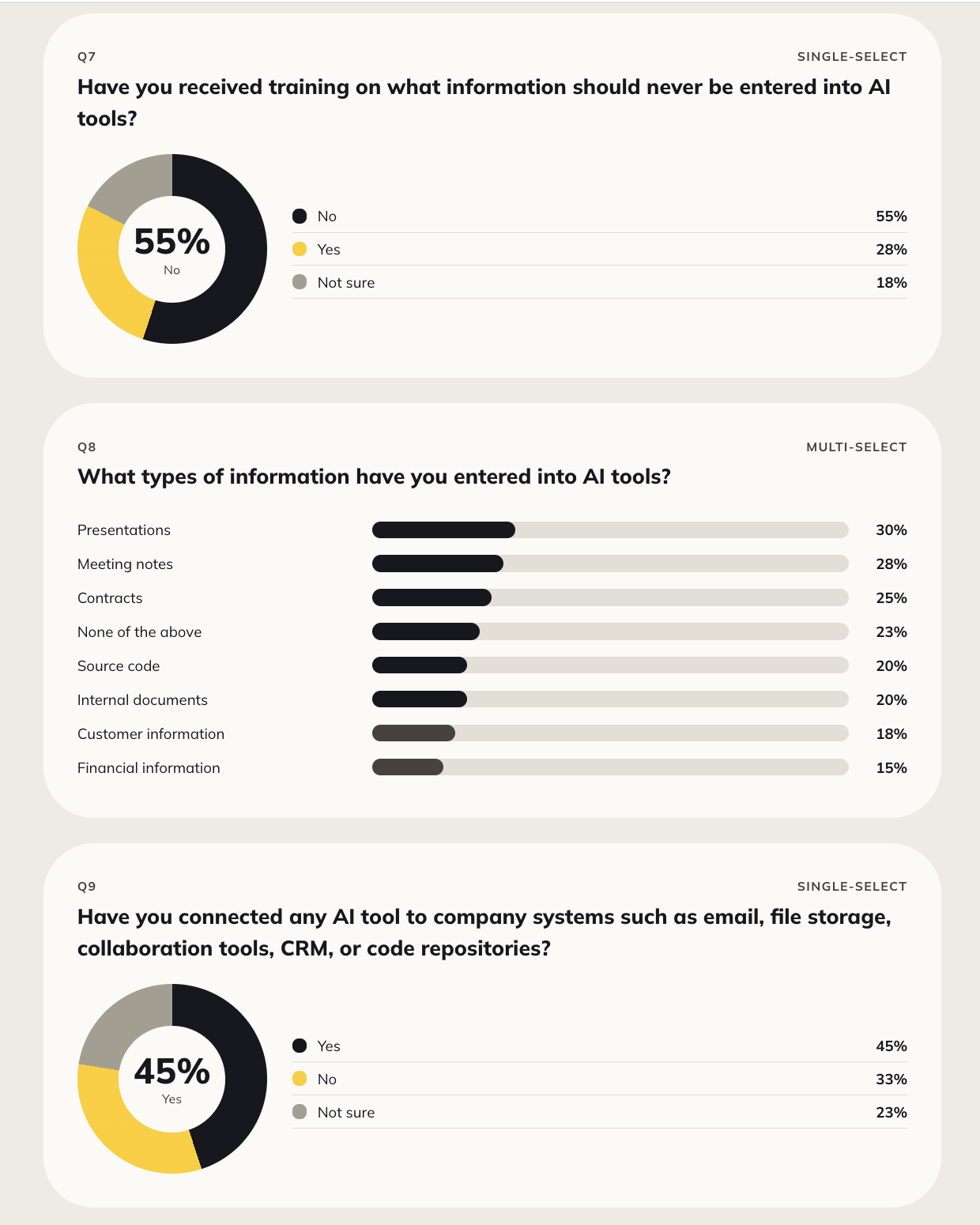
Your dashboard breaks the score down by question, covering:

  • How familiar your team is with AI, and how often they use it
  • What they actually use it for (writing, coding, data, customer support, and more)
  • Personal AI accounts used for work
  • Training on what not to enter into AI tools
  • Sensitive data already typed into AI tools
  • AI tools connected to company systems
  • AI agents or automations built without IT’s knowledge
  • Whether employees know which tools are approved
  • What’s blocking them from using AI more effectively
  • & much more

Each becomes its own chart, combined and anonymous, never tied to one person.

Screenshot 2026-10-12 at 2.34.20 PM

What You'll Learn From the Assessment

  • See how AI is being used across your team.

    Not the policy on paper, but what's really happening day to day.

  • Spot where it's becoming a risk.

    The specific behaviors (not people) most likely to expose sensitive data or introduce errors nobody's checking.

  • Know where to focus your policy or training.

    use real, anonymous data instead of a guess about what your team needs to hear.

Have Questions or want a demo?

FAQ

Create a free Wizer account, upload or add your employees, choose a phishing template, and launch your simulation. Once it's complete, you'll see who clicked, who ignored the email, and who reported it.

Yes. The phishing simulation is included with your free 10-day access to Wizer. No credit card is required, and there's no commitment.

By default, employees are asked to register before participating in a phishing simulation. This helps verify recipients and protect against misuse.

If your goal is to run a surprise phishing simulation without requiring employee registration, contact our team after signing up. We'll work with you to determine if that option is available for your account.

Most organizations can launch their first phishing simulation in just a few minutes. Wizer includes ready-to-use phishing templates, so there's nothing to build from scratch.

You'll get a clear report showing:

  • Who clicked the phishing email
  • Who reported it
  • Who ignored it
  • Overall click and report rates

These insights help you identify where additional security awareness training may be needed.

No harm is done. The simulation is completely safe. You can choose to automatically direct employees to a short training video that explains what they missed and how to spot similar attacks in the future.

Yes. You can use one of Wizer's ready-made phishing templates or customize the email to better match your organization's needs.

You can run your simulation with up to 100 employees during your free trial.

Your free access ends automatically after 10 days. If you'd like to continue using phishing simulations, security awareness training, and the rest of Wizer's features, you can choose a paid plan. There's no obligation to continue.

No. The simulation is designed to feel like a real phishing email, allowing you to measure how employees would respond in a real-world situation. Once the simulation is complete, you can use the results as a learning opportunity rather than a punishment.

Wizer is trusted by more than 20,000 organizations and partners with Acronis, Cowbell, Coalition, AtBay, Tokio Marine HCC, Acrisure, MISBO, Travelers, JIFs, and others.